 Tarazuترازو
The business system that lives in your office.
Tarazu runs sales, stock, tax invoices, payroll and the accounts of a Saudi company from one Windows PC, in Arabic and English. There is no cloud account and no database server, and your records never leave the building.
SAR 2,000one-time licence. No subscription.
| Description | Amount (SAR) |
|---|---|
| Supply and installation | 12,400.00 |
| Site labour, 3 days | 3,150.00 |
| Delivery | 450.00 |
| Total before VAT | 16,000.00 |
| VAT 15% | 2,400.00 |
| Total due | 18,400.00 |
- It runs on your own PCOne Windows computer in the office holds the system and the data. Everyone else opens it in a browser over the office network.
- ZATCA Phase 2 is in the coreTax invoices are signed, cleared or reported, and printed with their QR code by the same system that wrote them.
- Arabic and English, all the way throughEvery screen works in both languages, and every document prints in Arabic, English, or both side by side.
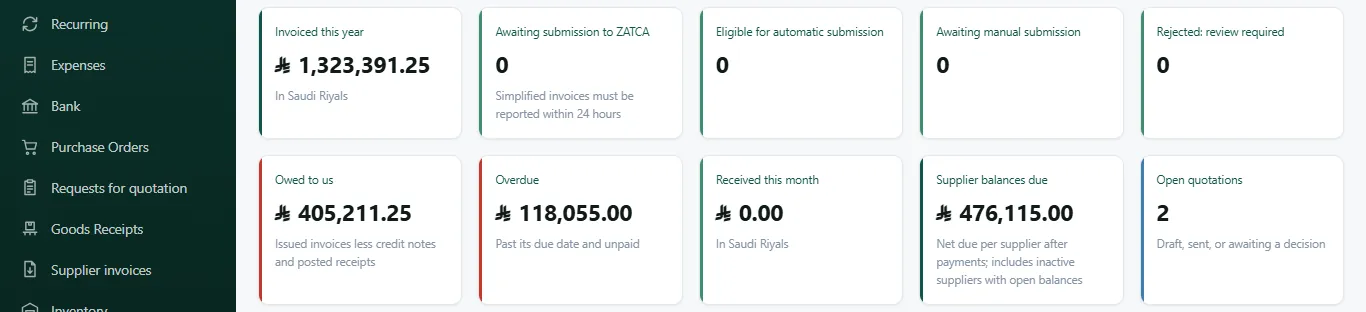
This is the screen your team opens in the morning.
What is owed, what is overdue, what is waiting for ZATCA and what needs approving, before the first coffee.

No rent to pay, and nothing to host.
Install Tarazu on one Windows PC and that PC becomes the office server. There is no monthly account to keep alive and no database engine to look after.
- Accounts desk
- Sales desk
- Warehouse
- A phone on site
- Your data
- One folder on your own disk. Copy it and you have copied the company's records.
- Backups
- A checked backup every day to a second folder you choose, and one by hand whenever you want.
- Internet
- Needed to activate the licence, to reach ZATCA, and to send email. The day's work runs on your own network.
- People
- Each person signs in with their own account and role, so the audit trail shows who did what.
One system for the whole working day.
From the first quotation to the VAT return. Each area shares the same customers, items and ledger, so nothing is typed twice.
- SalesQuotations with revisions and approval, sales orders, delivery notes, price lists.
- LeadsLeads and opportunities by stage, follow-ups on the dashboard, conversion to a quotation.
- PurchasingPurchase orders with an approval limit, goods receipts, supplier evaluation.
- InventorySeveral warehouses, weighted-average cost, batches, serial numbers, stock counts.
- ManufacturingBills of materials, work orders, material planning, batch trace.
- Point of saleTills that issue signed simplified tax invoices, with shifts and returns.
- Tax invoicesZATCA Phase 2 invoices, credit and debit notes, cleared or reported.
- PaymentsReceipts and payments allocated against invoices, statements, withholding tax.
- BankStatement import, matching against vouchers, and the reconciliation.
- CustodyPetty cash and employee advances, counted and signed for.
- People and payrollStaff records, document expiry, payroll runs, GOSI, WPS file, end of service.
- ProjectsJob costing, monthly cost plan, plant hire at day rates.
- QualityInspection plans, NCRs, calibration, internal audits, management review.
- ReportsSales, purchasing, stock and finance, with PDF and CSV export and a 13-week cash forecast.
E-invoicing is not an add-on here.
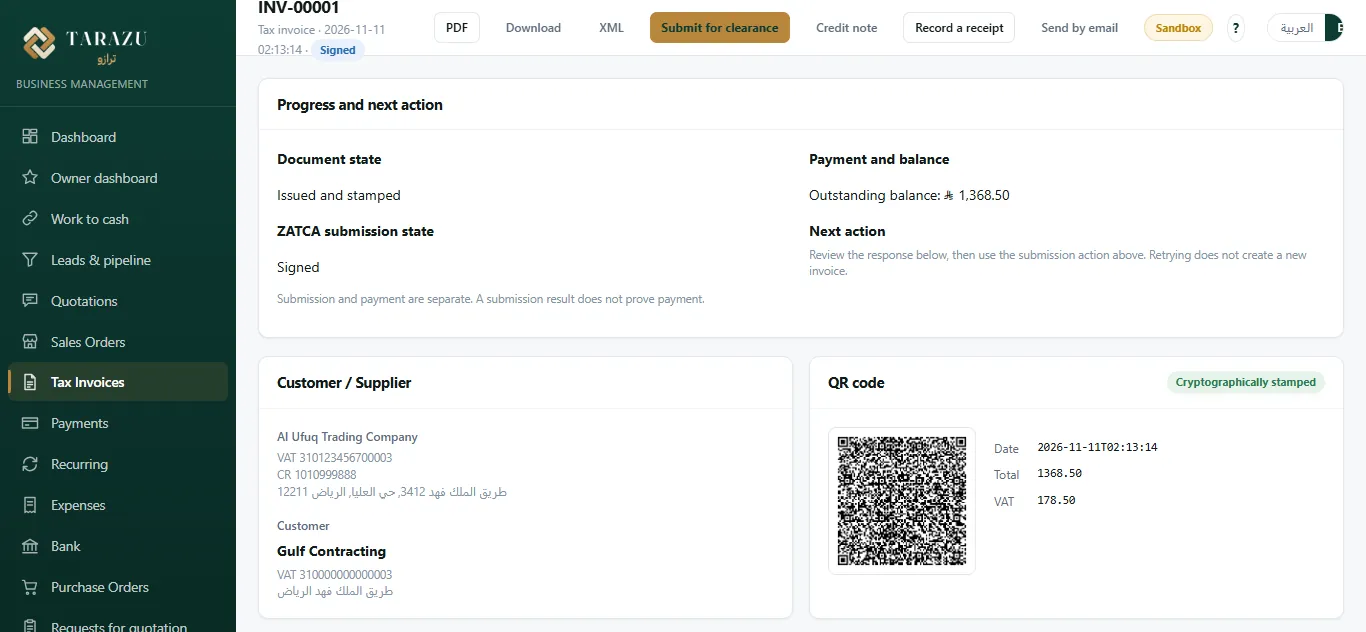
The invoice you write is the invoice ZATCA receives. Tarazu builds the XML, signs it, sends it and prints the result, without a second program in the middle.
- WriteIssue a tax invoice, a simplified tax invoice, or a credit or debit note from the sales documents you already have.
- SignTarazu produces the UBL 2.1 XML and signs it with your own stamp certificate.
- Clear or reportStandard invoices go to ZATCA for clearance. Simplified invoices are reported in the background, inside the 24 hours ZATCA allows.
- PrintThe PDF carries the QR code and embeds the signed XML, in Arabic, English or both.
- VAT return
- The return is laid out in ZATCA's sixteen boxes, then filed, frozen, and settled in the ledger.
- Zakat and withholding
- A zakat working paper from the ledger each year, and withholding tax on non-resident suppliers with its monthly return.
- Getting connected
- You connect with a one-time code from your own Fatoora account. We take you through ZATCA's sandbox first, then production.
Waiting for a second person who holds the permission for this action.
Bring your own AI, and keep your own rules.
Tarazu has no AI inside it. If your company already uses one, it can ask Tarazu's named workers to do real jobs, and anything that matters waits for a person.
- One door
- Your AI connects through a single gateway and sees a handful of tools. It never touches the database.
- A second person
- Anything that moves money or stock, sends a document or changes a price waits in the approvals inbox.
- Never
- No job exists for licences, users, roles, settings, signing or closing a period. Every job is written to the audit trail.
Set up for your line of business.
The same core, arranged for how your company actually earns its money.
Price
One payment for the licence. No monthly fee, no yearly renewal to keep working.
- ZATCA Phase 2 e-invoicing included, not sold beside it
- Arabic and English screens, documents and user guides
- Installed on your PC, with your data in your own folder
- A live demo with your kind of documents before you pay
See it with your own documents.
Tell us what your company does and we will show you a quotation, a tax invoice and a month end the way your team would do them.